Building a ChatGPT App Without a Paid Account or Developer Mode (July 2026)
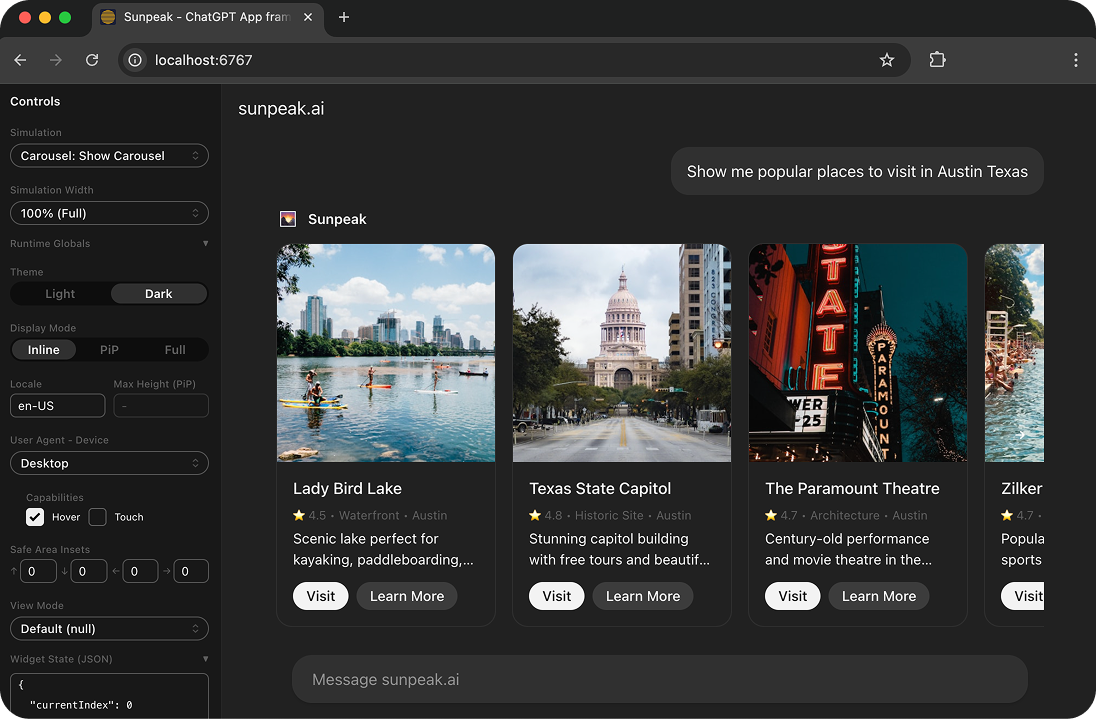
The sunpeak ChatGPT App Inspector running locally.
Want to build a ChatGPT App but do not have ChatGPT Developer Mode? You can still build the app.
A ChatGPT App is an MCP App: a tool-backed UI that runs inside an AI host. The part you need to build is mostly standard web and MCP work. You define tools, serve resources, return structuredContent and _meta, render a sandboxed iframe, and test the UI across host states. None of that requires a live ChatGPT session.
TL;DR: Run npx sunpeak new sunpeak-app, then cd sunpeak-app && pnpm dev. Open localhost:3000 to build and test your ChatGPT App in a local replica of the ChatGPT runtime. Use ChatGPT Developer Mode only when you are ready to live-test the same MCP endpoint in ChatGPT.
What You Can Build Without ChatGPT
You can build the parts that decide whether the app is good:
- The MCP server that exposes tools and resources.
- The app resource, usually HTML and React, rendered in a sandboxed iframe.
- The tool schema, annotations, and descriptions that guide model tool calls.
- The tool result contract, including
structuredContentfor model-visible data and_metafor app-only data. - Display mode layouts for inline, fullscreen, and picture-in-picture views.
- Loading, empty, error, auth, and large-data states.
- Automated tests for the tool contract, iframe rendering, visual regressions, and model/tool-calling behavior.
That is enough to catch most ChatGPT App bugs before you touch the real host. Live ChatGPT testing is still useful, but it should be a final integration check, not your main development loop.
Why Developer Mode Is Not Needed Locally
OpenAI’s Developer Mode lets a ChatGPT workspace connect to a custom MCP server. As of June 2026, OpenAI documents full MCP support and Developer Mode for ChatGPT Business, Enterprise, and Edu customers, with a more limited read/fetch path for Pro users. That matters for live testing because ChatGPT needs the right workspace and host setting before it can call your custom server.
Local development has a different job. You need a predictable host runtime where you can render the app, change state, repeat tests, and debug the MCP contract. The sunpeak Inspector does that on your machine. It starts a local ChatGPT-style runtime, renders your app resource, and lets you switch host, theme, display mode, viewport, tool result, and simulation state without a ChatGPT account.
Create a project:
npx sunpeak new sunpeak-app
cd sunpeak-app
pnpm dev
Then open localhost:3000. If your terminal prints a different port, use that port.
The Local ChatGPT App Loop
A good local loop has four pieces.
First, build the resource. In a sunpeak project, resources live under src/resources/. They are regular React components that read tool data and render UI. The same component can run in ChatGPT, Claude, and other MCP App hosts if it sticks to portable MCP App APIs.
Second, define the tool. Tools live under src/tools/. A UI tool should describe what the model can call, point at the app resource, validate input, and return data in a shape the resource expects.
Third, create simulations. Simulation files under tests/simulations/ stand in for real model/tool results. Make one for the happy path, then add the states that tend to break UI: no results, too many results, missing optional fields, auth failures, slow responses, and partial data.
Fourth, automate the checks. The local Inspector gives you a fast manual loop, but tests keep the app from drifting.
pnpm test
pnpm test:visual
pnpm test:eval
Use Playwright tests for rendered iframe behavior. Use visual tests when display modes or host themes matter. Use evals when you need to know whether a model calls the right tool with the right arguments.
Inspect an Existing MCP Server
You do not have to start from a sunpeak scaffold. If you already have an MCP server, point the Inspector at it:
npx sunpeak inspect --server http://localhost:8000/mcpThis is useful when your backend is already written in another framework. You keep the server you have, then use sunpeak to inspect tools, render app resources, test host state, and build repeatable simulations around real MCP responses.
Use this path when:
- You have an existing MCP server and want to add a ChatGPT App UI.
- Your tool works, but the UI does not render.
- You need local tests around host behavior before asking for ChatGPT workspace access.
- You want to compare ChatGPT and Claude behavior from one local view.
Verify the MCP App Contract Before Live Testing
Most local ChatGPT App failures are contract failures. The React code may be fine, but the host cannot discover the resource, the tool result hides data in the wrong place, or the app only works in one display mode.
Check this before connecting to ChatGPT:
| Area | Local check |
|---|---|
| Tool discovery | tools/list includes the tool name, description, input schema, and annotations you expect. |
| Resource link | The tool points to the app resource with _meta.ui.resourceUri. |
| Resource availability | resources/list includes the resource, and resources/read can load it. |
| Result shape | Model-visible data is in structuredContent; app-only data is in _meta. |
| Display modes | Inline, fullscreen, and picture-in-picture layouts all fit their containers. |
| Host state | Light theme, dark theme, viewport changes, and safe-area behavior are tested. |
| Error handling | Empty, loading, error, cancelled, auth, and retry states are visible and tested. |
If a local Inspector view works but ChatGPT does not render it, start with the same contract. Compare the tunneled server response with the simulation that works locally. Make sure the URL points at the current local server, the tunnel has not changed, and the resource URI in the tool metadata matches the resource the server serves.
When You Actually Need ChatGPT Access
You need access to the real ChatGPT host for three jobs.
- Live model behavior. Local simulations are deterministic, which is better for daily development. A real ChatGPT session tells you how the model chooses tools, fills arguments, and explains the app output to a user.
- Host integration. ChatGPT has the real iframe sandbox, development app settings, and account-level policies. Run at least one live check before you ship.
- Distribution. If your app needs to reach ChatGPT users, submit a plugin that contains the app through the OpenAI Platform.
For everything else, local development is faster and cheaper. You can build the UI, test the tool contract, run CI, and prepare production bundles without paying for a ChatGPT account or spending host credits on every edit.
Connect to ChatGPT When You Are Ready
When the local app is ready, expose the MCP endpoint with a tunnel. For a quick manual test, a public tunnel such as ngrok works. For OpenAI’s recommended local development path, use the Secure MCP Tunnel from the Apps SDK docs.
ngrok http 8000Use the port your server prints. If your MCP endpoint is /mcp, the tunneled URL should look like this:
https://example.ngrok-free.dev/mcpDeveloper mode is required to add a custom app. Enable it from the user component in the bottom-left corner under Settings > Security and login > Developer mode. Then open Plugins from the ChatGPT sidebar, select an existing development app, or use the + button to add one with the tunneled MCP endpoint.
Keep the local Inspector open while you test in ChatGPT. The Inspector gives you a faster way to change simulations, while ChatGPT confirms the real host path. If live behavior differs, isolate the difference: model tool selection, tunnel URL, server response, resource metadata, iframe sandbox, or display mode.
Build for Production
When your app is ready to deploy, build and start the production server:
pnpm build
pnpm start
Deploy the MCP server anywhere that can serve your endpoint and resources. For framework-specific setups, use sunpeak’s server handlers instead of hand-wiring the MCP protocol. The deployment guide covers production configuration, and the local development guide walks through the tunnel and live test path in more detail.
The important habit is simple: treat ChatGPT as the integration target, not the editor. Build locally, test locally, prove the MCP App contract locally, then connect to ChatGPT when there is something worth checking in the real host.
Start with the sunpeak quickstart, read the ChatGPT App framework overview, or follow the full ChatGPT App tutorial.
Get Started
npx sunpeak newFurther Reading
- How to run your ChatGPT App locally - current local and live testing guide
- ChatGPT App tutorial - build a complete app from setup to deployment
- Complete guide to testing ChatGPT Apps
- ChatGPT App display mode reference
- MCP App tool _meta and resource URI visibility
- How to deploy an MCP App to production
- ChatGPT App framework - sunpeak overview
- sunpeak quickstart guide
- OpenAI Apps SDK quickstart
- OpenAI Developer Mode and MCP Apps in ChatGPT
- OpenAI Secure MCP Tunnel
- MCP Apps compatibility in ChatGPT
- MCP Apps specification
Frequently Asked Questions
Do I need a paid ChatGPT account to build a ChatGPT App?
No. You can build the MCP server, app resource, tool contract, simulations, UI states, and automated tests locally with sunpeak. A ChatGPT workspace with Developer Mode is only needed when you want to connect the same MCP endpoint to the real ChatGPT host for live testing.
Do I need ChatGPT Developer Mode for local ChatGPT App testing?
No. Developer Mode is an OpenAI host setting for connecting a custom MCP server to ChatGPT. sunpeak runs a local Inspector that replicates the ChatGPT App runtime, so you can test display modes, themes, tool results, app state, iframe behavior, and host context before using Developer Mode.
What ChatGPT account currently supports MCP Developer Mode?
OpenAI currently documents full MCP support and Developer Mode for ChatGPT Business, Enterprise, and Edu customers, with a more limited read/fetch path for Pro users. Access details can change, so check OpenAI's Developer Mode and MCP Apps documentation before planning a live ChatGPT test. Local sunpeak development does not depend on that access.
What is the sunpeak Inspector and how does it help with ChatGPT App development?
The sunpeak Inspector is a local host runtime replica for MCP Apps. It renders your app resource in a sandboxed iframe, lets you switch host, theme, display mode, and viewport state, feeds deterministic mock tool data into the app, and hot-reloads changes while you build.
Can I test an existing MCP server without creating a new sunpeak project?
Yes. Run "npx sunpeak inspect --server <url>" against an existing MCP server. That gives you a local ChatGPT-style inspector for tools, resources, tool results, _meta data, structuredContent, and host bridge behavior without moving your server into a sunpeak project.
What should I verify before connecting a ChatGPT App to the real ChatGPT host?
Verify that tools/list exposes the right schema and annotations, resources/list includes the app resource, the tool points to the resource with _meta.ui.resourceUri, the tool result returns model-visible data in structuredContent, private app data stays in _meta, and each display mode renders correctly.
Can I run automated tests on my ChatGPT App without a paid account?
Yes. sunpeak tests run against the local Inspector. Use simulation files for deterministic tool states, Playwright tests for rendered iframe behavior, visual tests for layout drift, and evals for model/tool-calling behavior. Local tests do not use a ChatGPT account or ChatGPT host credits.
Can one app work in ChatGPT and Claude?
Yes, if you build against the MCP Apps standard and keep host-specific features isolated. sunpeak lets you test the same app against replicated ChatGPT and Claude runtimes, which helps catch differences in display mode, theme, safe-area, tool, and host bridge behavior before shipping.
