

Overview
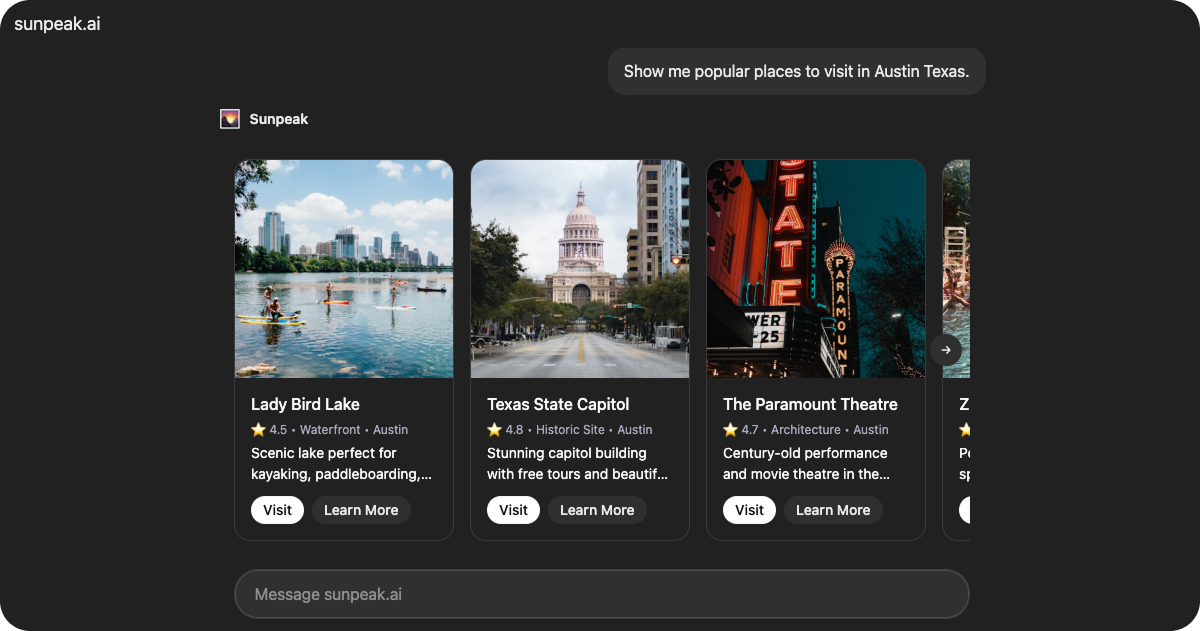
Carousel is a production-ready carousel resource included in the sunpeak framework. It displays places or items in a horizontal scrolling carousel with card components, featuring navigation arrows, edge gradients, and interactive buttons.
The resource retrieves place data from useToolData().output and adapts button sizes based on device capabilities.
Data Structure
CarouselData
The resource expects data in the following format viauseToolData().output:
CarouselCard[]
required
Array of place objects to display in the carousel.
string
required
Unique identifier for the place.
string
required
Place name displayed in the card header.
number
required
Rating value displayed in the metadata.
string
required
Category type displayed in the metadata.
string
required
Location displayed in the metadata.
string
required
URL to the place image.
string
required
Description text displayed in the card body.
string
Street address, shown in the fullscreen detail view.
string
Phone number, shown in the fullscreen detail view.
string
Operating hours, shown in the fullscreen detail view.
string
Price range indicator (e.g. “Free”, ”$$”), shown as a badge in the detail view.
string[]
List of highlight tags displayed as badges in the fullscreen detail view.
string[]
List of tips displayed in the fullscreen detail view.
Features
Carousel Navigation
Displays cards in a horizontal scrolling carousel with:- Navigation arrows for browsing
- Edge gradients to indicate more content
- Smooth scroll transitions
- Configurable card width (220px default)
- 16px gap between cards
Interactive Cards
Each card includes:- Image display with alt text
- Header with place name
- Metadata showing rating, category, and location
- Description text
- Two action buttons (Visit and Learn More)
Fullscreen Detail View
When a card is clicked, the resource requests fullscreen mode and displays a detail view with:- Centered hero image (preserves aspect ratio, never stretched)
- Star rating and category/price badges
- Full description text
- Info grid with address, hours, and phone when available
- Highlight tags displayed as colored badges
- Tips displayed as a styled list
- Action buttons (Visit, Learn More)
Responsive Button Sizing
The resource detects touch capabilities from the host context and automatically adjusts button sizes for easier interaction on touch devices.Safe Area Support
Wraps content in the<SafeArea> component, which automatically applies device safe area padding and viewport height constraints.
Common Use Cases
- Product galleries
- Place recommendations
- Restaurant or venue listings
- Travel destination browsing
- Service provider showcases