Claude Inspector for MCP Apps: Test Claude Connectors Locally with sunpeak (July 2026)
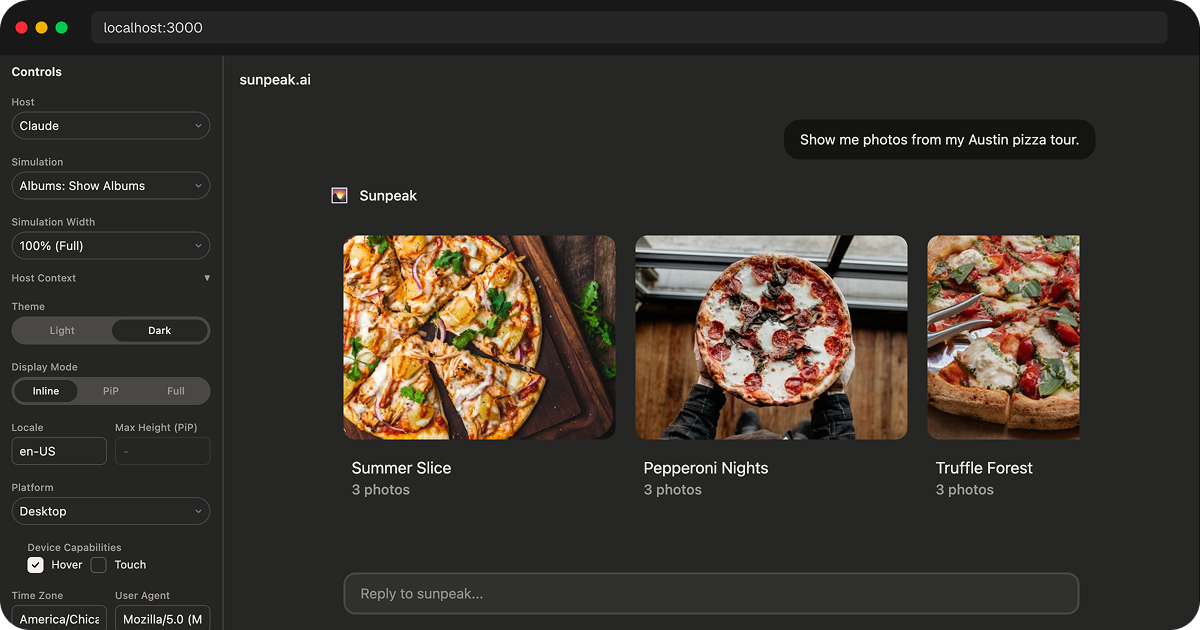
sunpeak Claude inspector.
TL;DR: Use the sunpeak Inspector to test Claude Connectors and MCP Apps locally before you deploy. Run pnpm dev in a sunpeak project, select Claude from the Host dropdown, and cover the same tool state with Playwright E2E and visual tests. Save real Claude and ChatGPT accounts for the checks only a live host can prove: public reachability, OAuth, model tool selection, account permissions, and submission readiness.
Interactive Claude Connectors are no longer just “does Claude call my tool?” projects. A production connector may expose remote MCP tools, return structuredContent, hydrate an iframe with _meta, render a UI resource, ask for write approval, handle OAuth, and still need to work in ChatGPT or another MCP Apps host.
That is too much to verify by deploying after every edit. You need a local runtime that can replay the exact tool result, render the resource in Claude-style chrome, and turn the state into an automated test. That is the job of the sunpeak Inspector.
What the Claude Inspector Actually Tests
The inspector is a local replica of the MCP App host runtime. It does not call the real Claude service. Instead, it gives your MCP App the same kind of environment a host provides: a conversation wrapper, host context, tool input, tool result, display mode, theme, viewport, and iframe boundary.
That makes it useful for the bugs you can reproduce with deterministic data:
- The tool returns the wrong
structuredContentshape. - The UI expects data in
_metathat the tool result does not provide. - The iframe works in ChatGPT chrome but clips in Claude chrome.
- A table, chart, or form breaks at narrow widths.
- An error state looks fine in light mode but unreadable in dark mode.
- A write action lacks a clear confirmation or success state.
- A connector has too many possible states to check by hand.
The official MCP Apps model is still simple at the center: a tool points at a UI resource, the host fetches that resource, and the resource renders inside a sandboxed iframe. The current MCP Apps docs describe ui:// resources, _meta.ui.resourceUri, CSP metadata, sandboxing, and JSON-RPC over postMessage as the browser bridge between host and app.
That is why local testing matters. Your code is not just a function handler. It is a protocol contract, a web app, and a host integration at the same time.
Start a Local Claude Runtime
For a new sunpeak project:
npx sunpeak new
cd sunpeak-app
pnpm dev
Open localhost:3000, then select Claude from the Host dropdown. You can also open the Claude runtime directly:
http://localhost:3000?host=claudeFor an existing MCP server:
npx sunpeak inspect --server http://localhost:8000/mcpUse this when your server is already built with another SDK or framework and you only need a local Claude and ChatGPT runtime for inspection. The inspector connects to the server, discovers the available tools and resources, and lets you render states without moving your server into a sunpeak project.
Use Simulations Instead of Repeating Prompts
Manual prompting is fine for a first check, but it is a poor test harness. A simulation pins the state you care about so every engineer and every CI run sees the same result.
A useful simulation usually captures:
- The user-facing scenario, such as “show overdue invoices.”
- The tool name and input.
- The tool result, including
content,structuredContent, and_meta. - The resource URI the host should render.
- Optional server mocks for follow-up actions.
That gives you repeatable coverage for empty lists, huge lists, expired OAuth, permission failures, destructive actions, slow loads, and partial data. These are the states that cause most connector bugs because they do not appear during a happy-path demo.
Check the Tool Result Contract
Before you focus on CSS, verify the result contract. OpenAI’s Apps SDK docs match the MCP Apps pattern here: structuredContent and content are visible to the model and component, while _meta is delivered to the component without appearing in the conversation transcript. If you provide an outputSchema, structuredContent must match it.
For Claude Connectors and ChatGPT Apps, this split is the difference between a clean app and a leaky one:
- Put the compact, model-relevant summary in
content. - Put typed UI data in
structuredContent. - Put UI-only lookup maps, private hydration details, and large render-only payloads in
_meta. - Keep secrets out of all three unless the host and user explicitly need them.
- Validate
structuredContentbefore the host sees it.
The inspector helps because you can see both sides of the failure. If the model-facing summary is wrong, the conversation view makes that obvious. If the iframe lacks the data it needs, the rendered app fails in the resource frame where you can debug it.
Test Claude Layout as Its Own Target
Claude and ChatGPT can both render MCP App-style resources, but they do not give your app identical surroundings. Conversation chrome, available width, theme variables, safe areas, iframe framing, file features, and host-specific APIs differ.
In the Claude runtime, check:
- Inline, fullscreen, and any other display modes your app requests.
- Narrow and wide viewports.
- Light and dark themes, including host CSS variables.
- Safe-area padding around sticky footers, toolbars, and action buttons.
- Long labels, empty values, and wrapping in dense tables.
- Error states that include a recovery action.
- Permission and confirmation screens for write tools.
Do the same state in the ChatGPT runtime when the app is meant to be cross-host. Keep shared MCP App code on shared concepts such as useToolData, useAppState, host context, display mode, resources, and tool results. Put ChatGPT-only features, such as file upload or file-library helpers, behind feature detection or host-specific imports.
Turn the Preview Into an E2E Test
The preview is useful once. The test is useful every time you change the app.
sunpeak’s Playwright fixture renders a tool state inside the inspector and gives you a locator scoped to the app iframe:
import { test, expect } from 'sunpeak/test';

test('invoice queue renders in Claude', async ({ inspector }) => {
  const result = await inspector.renderTool('show-invoice-queue');
  const app = result.app();

  await expect(app.getByRole('heading', { name: 'Overdue invoices' })).toBeVisible();
  await expect(app.getByText('$12,480')).toBeVisible();
  await expect(app.getByRole('button', { name: 'Approve reminder' })).toBeEnabled();
});
A good first E2E suite for a Claude Connector covers:
- The main happy path.
- Empty data.
- Auth expired.
- Permission denied.
- Large data.
- One write action, including confirmation and result state.
Add visual regression tests for states where layout matters more than text. Charts, boards, image grids, PDF previews, and dense tables are all better caught by screenshots than by one-off text assertions.
Know What Still Needs Live Claude
The inspector should do most of the work, but it should not be your only release gate.
Run a narrow live host check when you need to prove:
- Claude can reach the deployed MCP server over HTTPS.
- The server supports the transport your target host expects.
- OAuth redirects, token refresh, and account linking work.
- Claude selects the right tool from the real tool descriptions.
- User permissions and write approvals behave correctly in the host.
- Directory submission assets and screenshots match the live product.
- ChatGPT-specific app behavior works through ChatGPT’s real MCP Apps bridge.
Anthropic’s current MCP connector docs describe remote MCP servers through URL definitions, OAuth bearer tokens, allowlists, denylists, per-tool configuration, and public HTTP reachability requirements for the Messages API connector. OpenAI’s current Apps SDK docs describe ChatGPT Apps as MCP servers plus iframe UI bundles, with the MCP Apps bridge as the portable default and window.openai as the ChatGPT-specific compatibility and extension layer.
Local tests keep this live pass small. Instead of manually retesting every UI state in Claude, you use the real host to check the integration boundaries that cannot be simulated with full confidence.
A Practical Claude Connector Test Plan
Use this as a release checklist:
- Unit test every tool handler with normal, empty, denied, and failed upstream data.
- Contract test
inputSchema,outputSchema, tool annotations, and error results. - Render the main UI states in the Claude inspector.
- Render the same states in ChatGPT if the app is cross-host.
- Run E2E tests against the inspector in CI.
- Add visual tests for layouts that can regress without changing text.
- Check CSP, external API domains, iframe embeds, and resource domains.
- Run one live Claude smoke test against the deployed server.
- Run one live ChatGPT smoke test if you plan to ship there.
This split keeps fast, deterministic tests local and leaves the slower live-host loop for the few things that require it.
Where sunpeak Fits
You can build Claude Connector tests with plain Vitest, Playwright, an MCP SDK, and your own local host harness. sunpeak packages that workflow because the hard parts repeat across MCP Apps, ChatGPT Apps, and Claude Connectors.
Use npx sunpeak new when you want a structured MCP App project with a dev server, resources, tools, simulations, the inspector, E2E tests, visual tests, and evals already wired together.
Use npx sunpeak inspect --server URL when you already have an MCP server and want a local Claude or ChatGPT runtime for inspection and testing.
The goal is not to avoid real hosts forever. The goal is to stop using real hosts for every code change. Test the states you can control locally, run them in CI, and save Claude or ChatGPT for the final integration checks that only the real product can answer.
Get Started
npx sunpeak newFurther Reading
- Testing Claude Connectors - unit, inspector, E2E, visual, and live checks
- How to Build a Claude App - portable MCP App architecture for Claude
- Live Testing Claude Connectors and ChatGPT Apps - when real hosts still matter
- MCP App Resource Metadata - resourceUri, CSP, domains, and visibility
- MCP App Host Context, Safe Area, and Viewport - avoid cross-host layout bugs
- MCP App CSP and External API Calls - lock down iframe network access
- MCP App Inspector
- Claude Connector framework
- sunpeak testing framework
- Official MCP Apps overview
- OpenAI Apps SDK MCP server guide
- Anthropic MCP connector docs
Frequently Asked Questions
How do I test a Claude Connector locally?
For a new project, run npx sunpeak new, start the dev server with pnpm dev, and select Claude in the local inspector. For an existing MCP server, run npx sunpeak inspect --server URL and point it at your local or staging server. The inspector lets you test tool results, resources, display modes, themes, viewport sizes, app state, and error states before you connect a real Claude account.
What is the sunpeak Claude Inspector?
The sunpeak Claude Inspector is a local host runtime replica for MCP Apps and interactive Claude Connectors. It renders MCP App resources in Claude-style conversation chrome, loads deterministic simulation files, and gives Playwright tests a stable browser target so you can verify the same tool state repeatedly in local development and CI.
Can the sunpeak Inspector replace live Claude testing?
No. The inspector should handle most deterministic development checks, including UI rendering, tool-result shape, display modes, themes, and regression tests. You should still run a small live Claude check for public network reachability, OAuth, real host tool selection, connector setup, and any behavior that only the production Claude host can prove.
Does sunpeak support both Claude and ChatGPT testing?
Yes. sunpeak is a cross-host MCP App framework and testing framework. The local inspector can render the same tool state in Claude and ChatGPT runtime replicas, and the Playwright fixtures can run E2E and visual tests across those hosts from one test suite.
What should I test first in a Claude Connector?
Start with protocol contracts: inputSchema, outputSchema, tool annotations, content, structuredContent, _meta, resource metadata, CSP, and error results. Then test the rendered UI states in the Claude inspector, including empty states, large data sets, auth failures, write confirmations, narrow viewports, and dark or light theme behavior.
Do I need a paid Claude or ChatGPT account for local MCP App testing?
No. Local inspector tests run on your machine with mock data and do not consume host credits. You only need real host accounts when you are ready to validate the deployed server inside Claude or ChatGPT, test real OAuth, submit to a directory, or run a narrow live-host smoke test.
What is the difference between local inspector tests and live host tests?
Local inspector tests are deterministic and cheap. They should cover most UI states, tool-result shapes, visual regressions, and cross-host layout differences. Live host tests use the real Claude or ChatGPT product, so they are best for reachability, auth, host-specific model selection, account permissions, and submission readiness.
Can one MCP App run in Claude and ChatGPT?
Yes, if you keep the core app on the shared MCP Apps contract: tools, resources, structuredContent, _meta, resourceUri, CSP, display modes, host context, and app state. Use host-specific APIs only behind feature detection or separate host-specific paths, then test those paths separately.
