Documentation Index

Fetch the complete documentation index at: https://sunpeak.ai/docs/llms.txt

Use this file to discover all available pages before exploring further.

E2E Testing

E2E tests are Playwright specs in tests/e2e/*.spec.ts. The dev server starts automatically — Playwright launches it before running tests. Tests run against both ChatGPT and Claude hosts via Playwright projects.
pnpm test                               # Run unit + e2e
pnpm test:e2e                           # E2E only
pnpm test:e2e -- --ui                   # Playwright UI mode
pnpm test:e2e -- tests/e2e/albums.spec.ts  # Single file

Writing E2E Tests

Import test and expect from sunpeak/test. The mcp fixture provides protocol-level methods, and the inspector fixture handles rendering, double-iframe traversal, and host selection:
import { test, expect } from 'sunpeak/test';

test('should render album cards in light mode', async ({ inspector }) => {
  const result = await inspector.renderTool('show-albums', {}, { theme: 'light' });
  const app = result.app();
  await expect(app.locator('button:has-text("Summer Slice")')).toBeVisible();
});

test('should render in fullscreen mode', async ({ inspector }) => {
  const result = await inspector.renderTool('show-albums', {}, { displayMode: 'fullscreen' });
  const app = result.app();
  await expect(app.locator('button:has-text("Summer Slice")')).toBeVisible();
});
The config is a one-liner:
// playwright.config.ts
import { defineConfig } from 'sunpeak/test/config';
export default defineConfig();
This auto-detects sunpeak projects and creates per-host Playwright projects (chatgpt, claude). Each test runs once per host automatically — no host loops needed.
For non-sunpeak projects, pass a server option to defineConfig:
import { defineConfig } from 'sunpeak/test/config';
export default defineConfig({
  server: 'http://localhost:8000/mcp',
});
For stdio servers, pass a command and optional configuration:
import { defineConfig } from 'sunpeak/test/config';
export default defineConfig({
  server: {
    command: 'python', args: ['server.py'],
    env: { DATABASE_URL: 'sqlite:///test.db' },
    cwd: './my-server',
  },
  timeout: 90_000, // Server startup timeout in ms (default: 60000)
});

URL Parameters

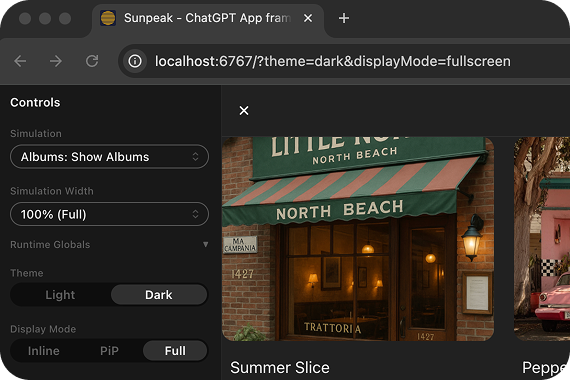
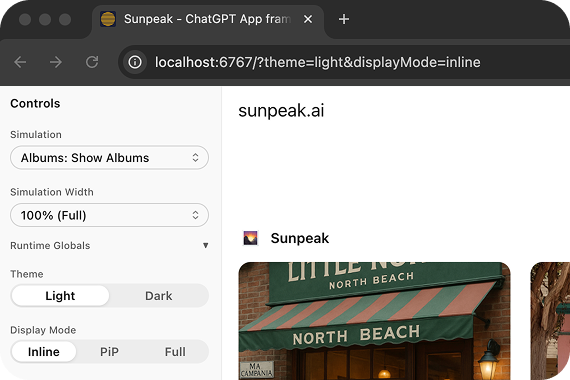
Inspector set to fullscreen dark mode via URL params Inspector set to inline light mode via URL params

Protocol methods

Test your MCP server at the protocol level without rendering anything:
test('server exposes expected tools', async ({ mcp }) => {
  const tools = await mcp.listTools();
  const search = tools.find(t => t.name === 'search');
  expect(search).toBeDefined();
  expect(search.inputSchema.properties).toHaveProperty('query');
});

test('search tool returns results', async ({ mcp }) => {
  const result = await mcp.callTool('search', { query: 'headphones' });
  expect(result.isError).toBeFalsy();
  expect(result.structuredContent.results.length).toBeGreaterThan(0);
});

test('resources have correct metadata', async ({ mcp }) => {
  const resources = await mcp.listResources();
  const app = resources.find(r => r.name === 'search-results');
  expect(app?.mimeType).toBe('text/html');
});
MethodDescription
listTools()List all tools. Returns Tool[].
callTool(name, input?)Call a tool, return the raw MCP result.
listResources()List all resources. Returns Resource[].
readResource(uri)Read a resource by URI. Returns the content string.

renderTool

inspector.renderTool renders the tool result in the inspector and returns an InspectorResult with both the MCP data and a UI locator. With input, the tool is called on the real server. Without input, simulation fixture data is used when available. The returned InspectorResult includes a source field ('fixture' or 'server') indicating where the data came from, and a screenshot() method for visual regression. Inspector sidebars are hidden by default in this fixture so app e2e and visual tests do not depend on inspector layout. Pass { sidebar: true } when a test needs the inspector controls.
// Call the real server with specific arguments
const result = await inspector.renderTool('search', { query: 'test', limit: 10 });
expect(result).not.toBeError();

const app = result.app();
await expect(app.getByText('test')).toBeVisible();

// Use simulation fixture data, or call server with empty args
const result = await inspector.renderTool('show-albums', undefined, { theme: 'dark' });
The options object accepts theme, displayMode, sidebar, and timeout. Per-call timeout overrides the config default.

Configuring default timeouts

import { defineConfig } from 'sunpeak/test/config';
export default defineConfig({
  server: { url: 'http://localhost:8000/mcp' },
  use: {
    mcpTimeout: 30_000, // Default for renderTool (default: 15s)
  },
});

Testing Backend-Only Tools

If your resource calls backend tools via useCallServerTool, define mock responses using the serverTools field in the simulation JSON. The inspector resolves these mocks based on the tool call arguments:
// tests/simulations/review-purchase.json
{
  "tool": "review-purchase",
  "toolResult": { "structuredContent": { "..." } },
  "serverTools": {
    "review": [
      {
        "when": { "confirmed": true },
        "result": {
          "content": [{ "type": "text", "text": "Completed." }],
          "structuredContent": { "status": "success", "message": "Completed." }
        }
      },
      {
        "when": { "confirmed": false },
        "result": {
          "content": [{ "type": "text", "text": "Cancelled." }],
          "structuredContent": { "status": "cancelled", "message": "Cancelled." }
        }
      }
    ]
  }
}
import { test, expect } from 'sunpeak/test';

test('should show success when server confirms', async ({ inspector }) => {
  const result = await inspector.renderTool('review-purchase');
  const app = result.app();

  await app.locator('button:has-text("Place Order")').evaluate((el) => (el as HTMLElement).click());

  // The serverTools mock matches { confirmed: true } and returns success
  await expect(app.locator('text=Completed.')).toBeVisible({ timeout: 10000 });
});

test('should show cancel when user rejects', async ({ inspector }) => {
  const result = await inspector.renderTool('review-purchase');
  const app = result.app();

  await app.locator('button:has-text("Cancel")').evaluate((el) => (el as HTMLElement).click());

  // The serverTools mock matches { confirmed: false } and returns cancelled
  await expect(app.locator('text=Cancelled.')).toBeVisible({ timeout: 10000 });
});
The serverTools field supports both simple (single result) and conditional (when/result array) forms. See Simulation API Reference for details.

Example E2E Test Structure

A typical e2e test file tests a resource across different modes. Each test runs automatically against both ChatGPT and Claude hosts:
import { test, expect } from 'sunpeak/test';

test('should render album cards with correct styles', async ({ inspector }) => {
  const result = await inspector.renderTool('show-albums', {}, { theme: 'light' });
  const app = result.app();

  const albumCard = app.locator('button:has-text("Summer Slice")');
  await expect(albumCard).toBeVisible();

  const styles = await albumCard.evaluate((el) => {
    const computed = window.getComputedStyle(el);
    return { cursor: computed.cursor, borderRadius: computed.borderRadius };
  });
  expect(styles.cursor).toBe('pointer');
  expect(styles.borderRadius).toBe('12px');
});

test('should render with dark theme', async ({ inspector }) => {
  const result = await inspector.renderTool('show-albums', {}, { theme: 'dark' });
  const app = result.app();
  await expect(app.locator('button:has-text("Summer Slice")')).toBeVisible();
});

test('should render in fullscreen', async ({ inspector }) => {
  const result = await inspector.renderTool('show-albums', {}, { displayMode: 'fullscreen' });
  const app = result.app();
  await expect(app.locator('button:has-text("Summer Slice")')).toBeVisible();
});

test('pip mode works (ChatGPT only)', async ({ inspector }) => {
  test.skip(inspector.host === 'claude', 'Claude does not support PiP');
  const result = await inspector.renderTool('show-albums', {}, { displayMode: 'pip' });
  await expect(result.app().locator('button:has-text("Summer Slice")')).toBeVisible();
});

Best Practices

Test one thing per test case. Clear tests are maintainable tests.
// Good
it('displays error message when API fails', () => {})

// Bad
it('test 1', () => {})
Test what users see and interact with, not implementation details:
// Good
expect(screen.getByText('Submit')).toBeInTheDocument();

// Bad
expect(component.props.buttonLabel).toBe('Submit');
Use inspector.renderTool() options to test your resources in different configurations. Tests run across ChatGPT and Claude hosts automatically via Playwright projects. Pass theme and displayMode as options:
await inspector.renderTool('show-weather', {}, { theme: 'dark', displayMode: 'fullscreen' });
See MCP Apps Display Modes for how hosts handle inline, fullscreen, and PiP views.
Use result.screenshot() in tests that cover important visual states (light/dark theme, fullscreen, empty states). Visual tests catch CSS regressions that functional assertions miss:
await result.screenshot('albums-dark');
await result.screenshot('albums-fullscreen');
Use afterEach to reset state between tests:
afterEach(() => {
  // Clean up mocks, reset state, etc.
});

Learn More

Visual Regression Testing

Screenshot comparison and baseline management.

Inspector

The runtime that powers E2E tests.

Simulations

JSON schema, conventions, and auto-discovery.