> ## Documentation Index
> Fetch the complete documentation index at: https://sunpeak.ai/docs/llms.txt
> Use this file to discover all available pages before exploring further.
# E2E Testing
> End-to-end testing of MCP Apps using the inspector, Playwright, and simulations.
## E2E Testing
E2E tests are Playwright specs in `tests/e2e/*.spec.ts`. The dev server starts automatically — Playwright launches it before running tests. Tests run against both ChatGPT and Claude hosts via Playwright projects.
```bash theme={null}
pnpm test # Run unit + e2e
pnpm test:e2e # E2E only
pnpm test:e2e -- --ui # Playwright UI mode
pnpm test:e2e -- tests/e2e/albums.spec.ts # Single file
```
```bash theme={null}
npm run test # Run unit + e2e
npm run test:e2e # E2E only
npm run test:e2e -- --ui # Playwright UI mode
npm run test:e2e -- tests/e2e/albums.spec.ts # Single file
```
```bash theme={null}
yarn test # Run unit + e2e
yarn test:e2e # E2E only
yarn test:e2e --ui # Playwright UI mode
yarn test:e2e tests/e2e/albums.spec.ts # Single file
```
### Writing E2E Tests
Import `test` and `expect` from `sunpeak/test`. The `mcp` fixture provides protocol-level methods, and the `inspector` fixture handles rendering, double-iframe traversal, and host selection:
```typescript theme={null}
import { test, expect } from 'sunpeak/test';
test('should render album cards in light mode', async ({ inspector }) => {
const result = await inspector.renderTool('show-albums', {}, { theme: 'light' });
const app = result.app();
await expect(app.locator('button:has-text("Summer Slice")')).toBeVisible();
});
test('should render in fullscreen mode', async ({ inspector }) => {
const result = await inspector.renderTool('show-albums', {}, { displayMode: 'fullscreen' });
const app = result.app();
await expect(app.locator('button:has-text("Summer Slice")')).toBeVisible();
});
```
The config is a one-liner:
```typescript theme={null}
// playwright.config.ts
import { defineConfig } from 'sunpeak/test/config';
export default defineConfig();
```
This auto-detects sunpeak projects and creates per-host Playwright projects (chatgpt, claude). Each test runs once per host automatically — no host loops needed.
For non-sunpeak projects, pass a `server` option to `defineConfig`:
```typescript theme={null}
import { defineConfig } from 'sunpeak/test/config';
export default defineConfig({
server: 'http://localhost:8000/mcp',
});
```
For stdio servers, pass a command and optional configuration:
```typescript theme={null}
import { defineConfig } from 'sunpeak/test/config';
export default defineConfig({
server: {
command: 'python', args: ['server.py'],
env: { DATABASE_URL: 'sqlite:///test.db' },
cwd: './my-server',
},
timeout: 90_000, // Server startup timeout in ms (default: 60000)
});
```
For sunpeak projects, the dev server is auto-detected and started:
```typescript theme={null}
import { defineConfig } from 'sunpeak/test/config';
export default defineConfig();
```
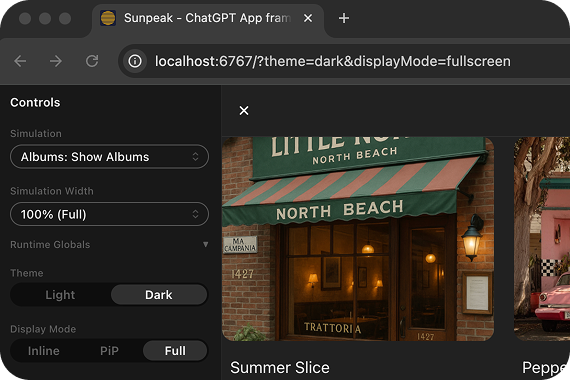
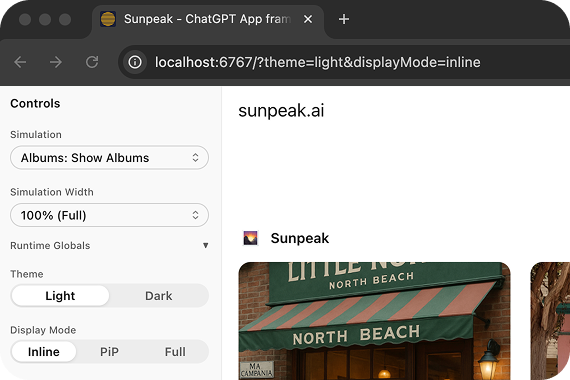
### URL Parameters
 ### Protocol methods
Test your MCP server at the protocol level without rendering anything:
```typescript theme={null}
test('server exposes expected tools', async ({ mcp }) => {
const tools = await mcp.listTools();
const search = tools.find(t => t.name === 'search');
expect(search).toBeDefined();
expect(search.inputSchema.properties).toHaveProperty('query');
});
test('search tool returns results', async ({ mcp }) => {
const result = await mcp.callTool('search', { query: 'headphones' });
expect(result.isError).toBeFalsy();
expect(result.structuredContent.results.length).toBeGreaterThan(0);
});
test('resources have correct metadata', async ({ mcp }) => {
const resources = await mcp.listResources();
const app = resources.find(r => r.name === 'search-results');
expect(app?.mimeType).toBe('text/html');
});
```
| Method | Description |
| ------------------------ | --------------------------------------------------- |
| `listTools()` | List all tools. Returns `Tool[]`. |
| `callTool(name, input?)` | Call a tool, return the raw MCP result. |
| `listResources()` | List all resources. Returns `Resource[]`. |
| `readResource(uri)` | Read a resource by URI. Returns the content string. |
### renderTool
`inspector.renderTool` renders the tool result in the inspector and returns an `InspectorResult` with both the MCP data and a UI locator. With `input`, the tool is called on the real server. Without `input`, simulation fixture data is used when available. The returned `InspectorResult` includes a `source` field (`'fixture'` or `'server'`) indicating where the data came from, and a `screenshot()` method for visual regression. Inspector sidebars are hidden by default in this fixture so app e2e and visual tests do not depend on inspector layout. Pass `{ sidebar: true }` when a test needs the inspector controls.
```typescript theme={null}
// Call the real server with specific arguments
const result = await inspector.renderTool('search', { query: 'test', limit: 10 });
expect(result).not.toBeError();
const app = result.app();
await expect(app.getByText('test')).toBeVisible();
// Use simulation fixture data, or call server with empty args
const result = await inspector.renderTool('show-albums', undefined, { theme: 'dark' });
```
The options object accepts `theme`, `displayMode`, `sidebar`, and `timeout`. Per-call timeout overrides the config default.
### Configuring default timeouts
```typescript theme={null}
import { defineConfig } from 'sunpeak/test/config';
export default defineConfig({
server: { url: 'http://localhost:8000/mcp' },
use: {
mcpTimeout: 30_000, // Default for renderTool (default: 15s)
},
});
```
### Testing Backend-Only Tools
If your resource calls backend tools via `useCallServerTool`, define mock responses using the `serverTools` field in the simulation JSON. The inspector resolves these mocks based on the tool call arguments:
```json theme={null}
// tests/simulations/review-purchase.json
{
"tool": "review-purchase",
"toolResult": { "structuredContent": { "..." } },
"serverTools": {
"review": [
{
"when": { "confirmed": true },
"result": {
"content": [{ "type": "text", "text": "Completed." }],
"structuredContent": { "status": "success", "message": "Completed." }
}
},
{
"when": { "confirmed": false },
"result": {
"content": [{ "type": "text", "text": "Cancelled." }],
"structuredContent": { "status": "cancelled", "message": "Cancelled." }
}
}
]
}
}
```
```typescript theme={null}
import { test, expect } from 'sunpeak/test';
test('should show success when server confirms', async ({ inspector }) => {
const result = await inspector.renderTool('review-purchase');
const app = result.app();
await app.locator('button:has-text("Place Order")').evaluate((el) => (el as HTMLElement).click());
// The serverTools mock matches { confirmed: true } and returns success
await expect(app.locator('text=Completed.')).toBeVisible({ timeout: 10000 });
});
test('should show cancel when user rejects', async ({ inspector }) => {
const result = await inspector.renderTool('review-purchase');
const app = result.app();
await app.locator('button:has-text("Cancel")').evaluate((el) => (el as HTMLElement).click());
// The serverTools mock matches { confirmed: false } and returns cancelled
await expect(app.locator('text=Cancelled.')).toBeVisible({ timeout: 10000 });
});
```
The `serverTools` field supports both simple (single result) and conditional (`when`/`result` array) forms. See [Simulation API Reference](/testing/simulations#mocking-server-tool-calls) for details.
### Example E2E Test Structure
A typical e2e test file tests a resource across different modes. Each test runs automatically against both ChatGPT and Claude hosts:
```typescript theme={null}
import { test, expect } from 'sunpeak/test';
test('should render album cards with correct styles', async ({ inspector }) => {
const result = await inspector.renderTool('show-albums', {}, { theme: 'light' });
const app = result.app();
const albumCard = app.locator('button:has-text("Summer Slice")');
await expect(albumCard).toBeVisible();
const styles = await albumCard.evaluate((el) => {
const computed = window.getComputedStyle(el);
return { cursor: computed.cursor, borderRadius: computed.borderRadius };
});
expect(styles.cursor).toBe('pointer');
expect(styles.borderRadius).toBe('12px');
});
test('should render with dark theme', async ({ inspector }) => {
const result = await inspector.renderTool('show-albums', {}, { theme: 'dark' });
const app = result.app();
await expect(app.locator('button:has-text("Summer Slice")')).toBeVisible();
});
test('should render in fullscreen', async ({ inspector }) => {
const result = await inspector.renderTool('show-albums', {}, { displayMode: 'fullscreen' });
const app = result.app();
await expect(app.locator('button:has-text("Summer Slice")')).toBeVisible();
});
test('pip mode works (ChatGPT only)', async ({ inspector }) => {
test.skip(inspector.host === 'claude', 'Claude does not support PiP');
const result = await inspector.renderTool('show-albums', {}, { displayMode: 'pip' });
await expect(result.app().locator('button:has-text("Summer Slice")')).toBeVisible();
});
```
## Best Practices
Test one thing per test case. Clear tests are maintainable tests.
```tsx theme={null}
// Good
it('displays error message when API fails', () => {})
// Bad
it('test 1', () => {})
```
Test what users see and interact with, not implementation details:
```tsx theme={null}
// Good
expect(screen.getByText('Submit')).toBeInTheDocument();
// Bad
expect(component.props.buttonLabel).toBe('Submit');
```
Use `inspector.renderTool()` options to test your resources in different configurations. Tests run across ChatGPT and Claude hosts automatically via Playwright projects. Pass `theme` and `displayMode` as options:
```typescript theme={null}
await inspector.renderTool('show-weather', {}, { theme: 'dark', displayMode: 'fullscreen' });
```
See [MCP Apps Display Modes](/mcp-apps/introduction#what-display-modes-are-available) for how hosts handle inline, fullscreen, and PiP views.
Use `result.screenshot()` in tests that cover important visual states (light/dark theme, fullscreen, empty states). Visual tests catch CSS regressions that functional assertions miss:
```typescript theme={null}
await result.screenshot('albums-dark');
await result.screenshot('albums-fullscreen');
```
Use `afterEach` to reset state between tests:
```tsx theme={null}
afterEach(() => {
// Clean up mocks, reset state, etc.
});
```
## Learn More
Screenshot comparison and baseline management.
The runtime that powers E2E tests.
JSON schema, conventions, and auto-discovery.
### Protocol methods
Test your MCP server at the protocol level without rendering anything:
```typescript theme={null}
test('server exposes expected tools', async ({ mcp }) => {
const tools = await mcp.listTools();
const search = tools.find(t => t.name === 'search');
expect(search).toBeDefined();
expect(search.inputSchema.properties).toHaveProperty('query');
});
test('search tool returns results', async ({ mcp }) => {
const result = await mcp.callTool('search', { query: 'headphones' });
expect(result.isError).toBeFalsy();
expect(result.structuredContent.results.length).toBeGreaterThan(0);
});
test('resources have correct metadata', async ({ mcp }) => {
const resources = await mcp.listResources();
const app = resources.find(r => r.name === 'search-results');
expect(app?.mimeType).toBe('text/html');
});
```
| Method | Description |
| ------------------------ | --------------------------------------------------- |
| `listTools()` | List all tools. Returns `Tool[]`. |
| `callTool(name, input?)` | Call a tool, return the raw MCP result. |
| `listResources()` | List all resources. Returns `Resource[]`. |
| `readResource(uri)` | Read a resource by URI. Returns the content string. |
### renderTool
`inspector.renderTool` renders the tool result in the inspector and returns an `InspectorResult` with both the MCP data and a UI locator. With `input`, the tool is called on the real server. Without `input`, simulation fixture data is used when available. The returned `InspectorResult` includes a `source` field (`'fixture'` or `'server'`) indicating where the data came from, and a `screenshot()` method for visual regression. Inspector sidebars are hidden by default in this fixture so app e2e and visual tests do not depend on inspector layout. Pass `{ sidebar: true }` when a test needs the inspector controls.
```typescript theme={null}
// Call the real server with specific arguments
const result = await inspector.renderTool('search', { query: 'test', limit: 10 });
expect(result).not.toBeError();
const app = result.app();
await expect(app.getByText('test')).toBeVisible();
// Use simulation fixture data, or call server with empty args
const result = await inspector.renderTool('show-albums', undefined, { theme: 'dark' });
```
The options object accepts `theme`, `displayMode`, `sidebar`, and `timeout`. Per-call timeout overrides the config default.
### Configuring default timeouts
```typescript theme={null}
import { defineConfig } from 'sunpeak/test/config';
export default defineConfig({
server: { url: 'http://localhost:8000/mcp' },
use: {
mcpTimeout: 30_000, // Default for renderTool (default: 15s)
},
});
```
### Testing Backend-Only Tools
If your resource calls backend tools via `useCallServerTool`, define mock responses using the `serverTools` field in the simulation JSON. The inspector resolves these mocks based on the tool call arguments:
```json theme={null}
// tests/simulations/review-purchase.json
{
"tool": "review-purchase",
"toolResult": { "structuredContent": { "..." } },
"serverTools": {
"review": [
{
"when": { "confirmed": true },
"result": {
"content": [{ "type": "text", "text": "Completed." }],
"structuredContent": { "status": "success", "message": "Completed." }
}
},
{
"when": { "confirmed": false },
"result": {
"content": [{ "type": "text", "text": "Cancelled." }],
"structuredContent": { "status": "cancelled", "message": "Cancelled." }
}
}
]
}
}
```
```typescript theme={null}
import { test, expect } from 'sunpeak/test';
test('should show success when server confirms', async ({ inspector }) => {
const result = await inspector.renderTool('review-purchase');
const app = result.app();
await app.locator('button:has-text("Place Order")').evaluate((el) => (el as HTMLElement).click());
// The serverTools mock matches { confirmed: true } and returns success
await expect(app.locator('text=Completed.')).toBeVisible({ timeout: 10000 });
});
test('should show cancel when user rejects', async ({ inspector }) => {
const result = await inspector.renderTool('review-purchase');
const app = result.app();
await app.locator('button:has-text("Cancel")').evaluate((el) => (el as HTMLElement).click());
// The serverTools mock matches { confirmed: false } and returns cancelled
await expect(app.locator('text=Cancelled.')).toBeVisible({ timeout: 10000 });
});
```
The `serverTools` field supports both simple (single result) and conditional (`when`/`result` array) forms. See [Simulation API Reference](/testing/simulations#mocking-server-tool-calls) for details.
### Example E2E Test Structure
A typical e2e test file tests a resource across different modes. Each test runs automatically against both ChatGPT and Claude hosts:
```typescript theme={null}
import { test, expect } from 'sunpeak/test';
test('should render album cards with correct styles', async ({ inspector }) => {
const result = await inspector.renderTool('show-albums', {}, { theme: 'light' });
const app = result.app();
const albumCard = app.locator('button:has-text("Summer Slice")');
await expect(albumCard).toBeVisible();
const styles = await albumCard.evaluate((el) => {
const computed = window.getComputedStyle(el);
return { cursor: computed.cursor, borderRadius: computed.borderRadius };
});
expect(styles.cursor).toBe('pointer');
expect(styles.borderRadius).toBe('12px');
});
test('should render with dark theme', async ({ inspector }) => {
const result = await inspector.renderTool('show-albums', {}, { theme: 'dark' });
const app = result.app();
await expect(app.locator('button:has-text("Summer Slice")')).toBeVisible();
});
test('should render in fullscreen', async ({ inspector }) => {
const result = await inspector.renderTool('show-albums', {}, { displayMode: 'fullscreen' });
const app = result.app();
await expect(app.locator('button:has-text("Summer Slice")')).toBeVisible();
});
test('pip mode works (ChatGPT only)', async ({ inspector }) => {
test.skip(inspector.host === 'claude', 'Claude does not support PiP');
const result = await inspector.renderTool('show-albums', {}, { displayMode: 'pip' });
await expect(result.app().locator('button:has-text("Summer Slice")')).toBeVisible();
});
```
## Best Practices
Test one thing per test case. Clear tests are maintainable tests.
```tsx theme={null}
// Good
it('displays error message when API fails', () => {})
// Bad
it('test 1', () => {})
```
Test what users see and interact with, not implementation details:
```tsx theme={null}
// Good
expect(screen.getByText('Submit')).toBeInTheDocument();
// Bad
expect(component.props.buttonLabel).toBe('Submit');
```
Use `inspector.renderTool()` options to test your resources in different configurations. Tests run across ChatGPT and Claude hosts automatically via Playwright projects. Pass `theme` and `displayMode` as options:
```typescript theme={null}
await inspector.renderTool('show-weather', {}, { theme: 'dark', displayMode: 'fullscreen' });
```
See [MCP Apps Display Modes](/mcp-apps/introduction#what-display-modes-are-available) for how hosts handle inline, fullscreen, and PiP views.
Use `result.screenshot()` in tests that cover important visual states (light/dark theme, fullscreen, empty states). Visual tests catch CSS regressions that functional assertions miss:
```typescript theme={null}
await result.screenshot('albums-dark');
await result.screenshot('albums-fullscreen');
```
Use `afterEach` to reset state between tests:
```tsx theme={null}
afterEach(() => {
// Clean up mocks, reset state, etc.
});
```
## Learn More
Screenshot comparison and baseline management.
The runtime that powers E2E tests.
JSON schema, conventions, and auto-discovery.