> ## Documentation Index
> Fetch the complete documentation index at: https://sunpeak.ai/docs/llms.txt
> Use this file to discover all available pages before exploring further.
# Albums
> A photo album viewer with carousel display and fullscreen viewing capability.
 ## Overview
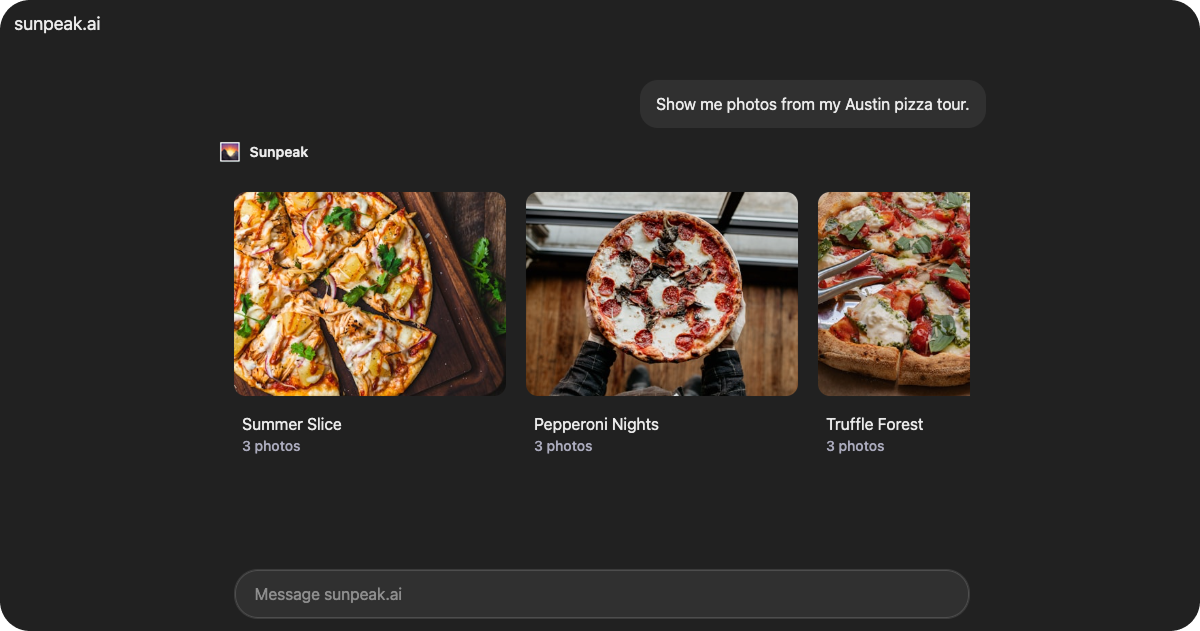
`Albums` is a production-ready album viewer resource included in the sunpeak framework. It displays photo albums in a carousel layout with the ability to open albums in fullscreen mode for detailed photo browsing. The component automatically switches between inline and fullscreen display modes.
The resource retrieves album data from `useToolData().output` and manages selection state with `useAppState()`.
## Data Structure
### AlbumsData
The resource expects data in the following format via `useToolData().output`:
```tsx theme={null}
interface AlbumsData {
albums: Album[]
}
interface Album {
id: string
title: string
cover: string
photos: Array<{
id: string
title: string
url: string
}>
}
```
Array of album objects to display.
Unique identifier for the album.
Album title displayed on the album card.
URL to the album cover image.
Array of photos in the album.
Unique identifier for the photo.
Photo title or caption.
URL to the full-resolution photo.
## Display Modes
The Albums resource has two display modes:
### Inline Mode (Default)
Displays albums in a horizontal scrolling carousel with album cards showing the cover image and photo count.
### Fullscreen Mode
When a user selects an album, the resource:
1. Sets the selected album ID in app state using `useAppState()`.
2. Requests fullscreen mode via `useDisplayMode()`.
3. Displays a fullscreen photo viewer with:
* Film strip navigation (desktop only).
* Large centered photo display.
* Automatic selection reset when switching albums.
## State Management
The resource uses `useAppState()` to persist the selected album across sessions:
```tsx theme={null}
interface AlbumsState {
selectedAlbumId?: string | null
}
```
## Features
### Safe Area Support
Wraps content in the `` component, which automatically applies device safe area padding and viewport height constraints.
## Common Use Cases
* Photo gallery applications
* Portfolio viewers
* Image collection browsing
* Media library interfaces
## Overview
`Albums` is a production-ready album viewer resource included in the sunpeak framework. It displays photo albums in a carousel layout with the ability to open albums in fullscreen mode for detailed photo browsing. The component automatically switches between inline and fullscreen display modes.
The resource retrieves album data from `useToolData().output` and manages selection state with `useAppState()`.
## Data Structure
### AlbumsData
The resource expects data in the following format via `useToolData().output`:
```tsx theme={null}
interface AlbumsData {
albums: Album[]
}
interface Album {
id: string
title: string
cover: string
photos: Array<{
id: string
title: string
url: string
}>
}
```
Array of album objects to display.
Unique identifier for the album.
Album title displayed on the album card.
URL to the album cover image.
Array of photos in the album.
Unique identifier for the photo.
Photo title or caption.
URL to the full-resolution photo.
## Display Modes
The Albums resource has two display modes:
### Inline Mode (Default)
Displays albums in a horizontal scrolling carousel with album cards showing the cover image and photo count.
### Fullscreen Mode
When a user selects an album, the resource:
1. Sets the selected album ID in app state using `useAppState()`.
2. Requests fullscreen mode via `useDisplayMode()`.
3. Displays a fullscreen photo viewer with:
* Film strip navigation (desktop only).
* Large centered photo display.
* Automatic selection reset when switching albums.
## State Management
The resource uses `useAppState()` to persist the selected album across sessions:
```tsx theme={null}
interface AlbumsState {
selectedAlbumId?: string | null
}
```
## Features
### Safe Area Support
Wraps content in the `` component, which automatically applies device safe area padding and viewport height constraints.
## Common Use Cases
* Photo gallery applications
* Portfolio viewers
* Image collection browsing
* Media library interfaces