What I Wish I Knew About Building ChatGPT Apps (August 2026)
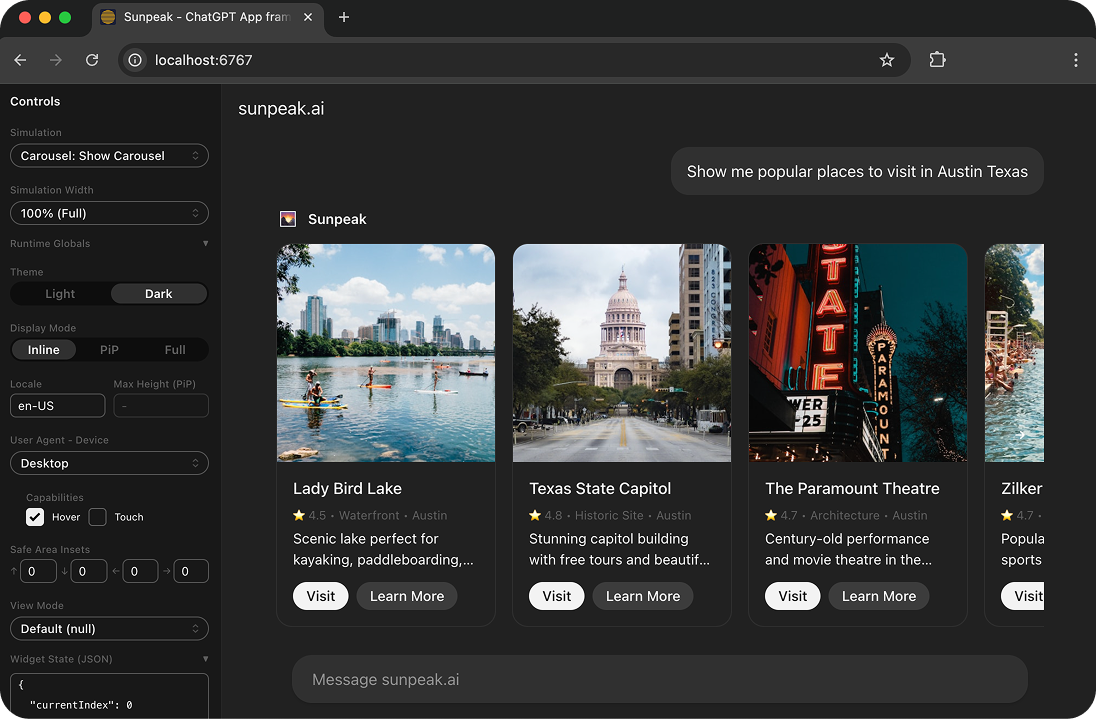
sunpeak ChatGPT App inspector running locally.
After building ChatGPT Apps through several changes in SDKs, metadata, and host behavior, I wish I had treated the system as a set of contracts much earlier. The React component is rarely the hard part. Most failures happen where the model, MCP server, host, iframe, and external service disagree about who owns data or what should happen next.
TL;DR: Build a ChatGPT App as a portable MCP App with a useful text-only path. Keep business state and authorization on the server, use typed tool results, version UI resources, and test host states locally. Use ChatGPT-specific APIs only when they add a feature the shared standard does not provide, then test those final boundaries in Developer mode.
Lesson 1: Distribution and runtime are separate concepts
A ChatGPT App has two identities that are easy to mix up:
- At runtime, it is an MCP server plus an optional MCP Apps UI.
- In ChatGPT, it is distributed and managed as a plugin.
The runtime decides how tools are discovered, called, and rendered. The distribution layer covers publisher verification, review, directory listing, metadata snapshots, and updates. A tool can work perfectly over MCP while the installed plugin still points at stale metadata or an older UI resource.
That distinction gives you a better debugging order. First call the MCP server directly. Then render the linked UI resource in a local host replica. Only after those pass should you debug plugin installation, model tool selection, or production account access.
The MCP Apps extension defines the portable UI layer. A server registers tools and ui:// resources, a tool links to a resource through _meta.ui.resourceUri, and a host renders that resource in a sandboxed iframe. ChatGPT implements that standard and adds optional host APIs for features that are specific to ChatGPT.
I now write down the boundaries before I write components:
| Boundary | Owner | Failure to test |
|---|---|---|
| Tool input and output | MCP server | Invalid or incomplete model arguments |
| Business data and permissions | Server or backend service | Expired auth, wrong tenant, forbidden action |
| UI rendering and interaction | MCP Apps resource | Empty, loading, error, narrow, and repeated-call states |
| Display mode and theme | Host context | Inline, fullscreen, picture-in-picture, light, and dark |
| Plugin listing and metadata | ChatGPT distribution | Stale scan, rejected domain, missing review access |
This table is more useful than a framework diagram because each row turns into a test and has one clear owner.
Lesson 2: The text-only path is the baseline
A custom UI is optional in ChatGPT. More importantly, a UI-backed tool should remain useful when its iframe fails to load, the current host does not render apps, or an assistive workflow relies on the conversation instead of direct manipulation.
That makes a layered UI the right default. The tool’s content should explain what happened in a short, useful form. Its structuredContent should carry the typed data needed by both the model and UI. The UI can then add sorting, filtering, editing, charts, previews, or other direct interaction.
A good test is to temporarily remove _meta.ui.resourceUri from the tool registration. If the conversation becomes meaningless, the tool contract is too dependent on its View.
Custom UI pays for itself when users need to compare many records, inspect spatial or visual data, manipulate several controls, or complete a multi-step task without repeated prompts. A one-line confirmation or a short lookup often does not need an iframe at all.
This approach also improves model behavior because the tool result tells the model what changed. The model does not have to infer the outcome from UI-only state that it cannot see.
Lesson 3: Separate data tools from render tools
One of my early designs linked a UI resource to every tool. That made the app look complete in a demo, but it also caused the iframe to mount again for intermediate lookups and small mutations. The user saw flashes, lost local selection state, and had several nearly identical resources to maintain.
The better pattern is to separate tools by role:
- Data tools fetch or mutate server data and return concise results.
- Render tools return the full snapshot needed for a deliberate UI presentation.
- UI-initiated calls update one part of the experience without replacing the whole View when the host supports that flow.
For an order manager, search-orders can return structured matches without opening a dashboard. show-order-board can gather the initial board state and link to the UI resource. Once mounted, the board can call update-order-status, then update its own state from the returned contract.
This is not a hard rule that every app needs separate tool names. It is a question to answer intentionally: should this call create a new presentation, or should it update the presentation already on screen?
OpenAI’s current custom UI guide recommends keeping tools useful without a component and separating data work from rendering when repeated calls would remount the component. That advice matches what users feel immediately, even if they do not know why the interface jumped.
Lesson 4: Treat tool definitions as public contracts
The model sees tool names, descriptions, input schemas, and annotations. The UI depends on output shape and resource metadata. The host uses annotations to decide whether a call may read data, change data, or reach outside a closed system. Reviewers use the same metadata to understand what the app does.
Every UI-backed tool should make these facts explicit:
- A narrow input schema with useful field descriptions.
- An
outputSchemaforstructuredContent. - Accurate
readOnlyHint,destructiveHint, andopenWorldHintvalues. - A stable, descriptive tool name and description.
- A resource link when the call should render a View.
- Clear authentication and error behavior.
Avoid vague schema shapes such as Record<string, unknown> when the UI expects named fields. The schema is how the server, model, and View agree on nullability, enums, pagination, and errors. It also gives tests something exact to assert.
Annotations are hints, not access control. A destructive tool marked read-only may skip the right host warning, but marking it correctly does not authorize the user. The tool handler still has to validate the token, tenant, object ownership, requested transition, and any business rule on every call.
Published plugin metadata is also a release artifact. Changing a tool description, schema, annotation, authentication declaration, or UI resource can require a new scan and published version. Treat metadata review as part of the release, not documentation cleanup after deployment.
Lesson 5: Result channels and state ownership must be deliberate
MCP tool results have several channels, and each has a different audience:
return {
  content: [{ type: 'text' as const, text: `Found ${orders.length} open orders.` }],
  structuredContent: {
    orders: orders.map(toPublicOrder),
  },
  _meta: {
    nextCursor,
  },
};
Use content for a compact conversational result. Use structuredContent for typed, model-visible data the View can render. Use result _meta for host or View data that should stay out of the model transcript.
Do not treat _meta as a secret vault. The host and View can receive it, so it must not contain API keys, unrestricted signed credentials, or data the current user is not allowed to access. It is useful for presentation details such as a pagination cursor or a map configuration that would only distract the model.
State needs the same discipline:
| State | Where it belongs |
|---|---|
| Orders, documents, balances, and permissions | MCP server or backend service |
| Selected row, open tab, draft filter | Current UI instance |
| Cross-session user preference | Storage controlled by your service |
| Small UI fact the model needs for the next turn | ui/update-model-context |
ChatGPT may offer host-specific widget state, but that should not become the source of truth for business data. UI instances can be closed, repeated, or opened in more than one conversation. The server must survive all of those cases without trusting stale client state.
Lesson 6: Resource URIs are cache keys and release IDs
An MCP Apps resource URI is more than an address. Hosts can use it as a cache key. If you deploy breaking HTML, JavaScript, or CSS under the same URI, a conversation may keep running an older bundle against a newer server contract.
Version the URI when the bundle or its expected result schema changes:
const resourceUri = 'ui://order-board/v2026-08-31/index.html';Then update every tool that references it. A content hash works even better when your build can insert one automatically.
During ChatGPT development, refresh the plugin after changing tool names, descriptions, schemas, annotations, auth, or UI resources, then start a new conversation. The Developer mode connection guide describes the current flow: enable Developer mode under Security and login, add the public /mcp endpoint from the Plugins page, inspect the discovered tools, and refresh after metadata changes.
This gives each deployment an evidence chain:
- Server build and commit.
- Tool metadata scan.
- Versioned resource URI and asset build.
- Local contract and rendering tests.
- Development plugin refresh and live smoke test.
When a user reports a stale UI, those five IDs tell you whether the mismatch came from the server, resource cache, or plugin snapshot.
Lesson 7: The iframe is a security boundary
The View is an iframe client that receives data and can request server actions. Treat it the same way you would treat an untrusted browser client.
Register an exact content security policy for the resource. Allow only the domains needed for connect, images, scripts, styles, or embedded frames. Broad wildcards make review harder and turn a later script injection into a larger incident.
Keep secrets and privileged API calls on the server. Validate every tool argument even when it came from your own UI. Authorize every requested object and mutation against the current user. Use short-lived, scoped URLs when the View must fetch a protected file, and do not expose a credential that can be reused for unrelated calls.
Also assume that calls can be retried, cancelled, or delivered after the user changes the visible state. Mutation tools should have clear idempotency behavior. The UI should handle an authorization error or expired session without pretending the update succeeded.
The security model becomes easier to explain when the contract is plain: the iframe proposes an action, the MCP server decides whether it is allowed, and the backend records the result. Host approval screens can help users understand risk, but server authorization makes the decision.
Lesson 8: Host context is an input, not decoration
The same resource can appear inline in a conversation, expand to fullscreen, or move into picture-in-picture. It can run at a narrow mobile width, receive a safe area, switch themes, or use a different locale. These are layout and behavior inputs.
Read host context and respond to capability changes. Use standard MCP Apps fields and ui/* messages for the portable path. Feature-detect optional host APIs before calling them. Do not branch on a host name because hosts can add capabilities independently of their brand or version.
At minimum, exercise these states:
- Inline and fullscreen layouts, plus picture-in-picture if the app requests it.
- Light and dark themes.
- Desktop and narrow mobile widths.
- Long values, empty collections, and translated labels.
- Safe area changes and virtual-keyboard constraints.
- Loading, approval, error, cancellation, and repeated result delivery.
A component preview can catch CSS problems, but it cannot prove bridge initialization, host notifications, tool calls, or display-mode transitions. Test the resource inside an MCP App host runtime so the bridge is part of the test.
Lesson 9: Deterministic local tests should be the main loop
Live ChatGPT testing is useful for final integration, but it is slow and hard to reproduce. Model routing varies, accounts differ, remote resources are cached, and each manual run mixes several boundaries at once.
I now use a layered test loop:
- Tool handler tests cover schema validation, auth, external-service stubs, output schemas, and errors.
- Contract tests confirm the text fallback and typed
structuredContent. - Host tests render fixed tool inputs and results inside a replicated MCP Apps runtime.
- Browser tests cover UI-initiated calls, themes, display modes, and viewports.
- Visual tests catch clipping, overlap, missing assets, and unintended layout changes.
- A small live suite checks model selection, production auth, plugin metadata, and real ChatGPT behavior.
sunpeak’s testing framework runs those local host tests without spending ChatGPT credits on every code change. It connects to MCP servers over HTTP or stdio, so the server can be written in TypeScript, Python, Go, Rust, or another language.
For an existing server, start with:
npx sunpeak inspect --server http://localhost:8000/mcp
npx sunpeak test init --server http://localhost:8000/mcp
npx sunpeak test
A focused test can assert both the conversational contract and the View:
import { expect, test } from 'sunpeak/test';

test('open orders work with and without the View', async ({ mcp, inspector }) => {
  const result = await mcp.callTool('list-orders', { status: 'open' });

  expect(result.isError).toBeFalsy();
  expect(result.content).toEqual(
    expect.arrayContaining([expect.objectContaining({ type: 'text' })])
  );
  expect(result.structuredContent).toMatchObject({
    orders: expect.any(Array),
  });

  const rendered = await inspector.renderTool('list-orders', {
    status: 'open',
  });
  await expect(rendered.app().getByRole('heading', { name: 'Open orders' })).toBeVisible();
});
Add simulations for loading, empty, error, and cancelled states instead of trying to force each one through a live backend. Determinism is what lets the same failures run in CI and in a local editor.
Lesson 10: Submission and operations start during design
Submission requirements reach back into architecture. OpenAI’s current plugin submission guide calls for a public production endpoint, verified identity, a domain challenge, exact CSP declarations, reviewer access, and accurate tool annotations. An app submission includes exactly five positive and three negative test cases.
The negative cases matter because they test whether the model avoids calling a tool when it is irrelevant or unsafe. Write them while designing tool boundaries. If two tools are hard for a human reviewer to distinguish, their names and descriptions are probably hard for the model too.
Reviewer credentials must work without a private network, email handoff, SMS, or MFA step that blocks review. If the app uses OAuth, test first-time login, token expiry, revoked access, and reconnect behavior. Run the final metadata scan against production rather than assuming it matches source code.
Production operations need similar planning. Include trace IDs in server logs and safe error responses so one failed conversation can be followed across the host, MCP server, and external API. Measure tool latency and error rate separately from UI load failures. Expect several UI instances and retries. Keep rollback information for both the server build and resource URI.
The release checklist I use now is short because the detailed checks live in automation:
- Tool schemas, output schemas, annotations, and auth match production behavior.
- Text fallback and every documented View state pass locally.
- Resource URI, CSP, and assets match the deployed build.
- Five positive and three negative submission cases pass in Developer mode.
- Reviewer credentials, domain verification, logging, and rollback are ready.
The main lesson is that a ChatGPT App is a distributed system with an optional interface. Build the MCP contracts first, make the no-UI result useful, keep authority on the server, and prove each host state with deterministic tests. The custom View then becomes a reliable way to interact with the tool instead of the only place the app works.
Get Started
npx sunpeak newFurther Reading
- How to Build a ChatGPT App - current setup, UI, testing, and deployment guide
- How to Architect a ChatGPT App - technical build plan
- MCP App Tool Results - content, structuredContent, and _meta
- MCP App Resource Caching and Versioned UI
- MCP App Authentication and OAuth
- Pre-Submission Testing for MCP Apps
- sunpeak MCP App testing framework
- OpenAI: Build a custom UI for your ChatGPT plugin
- OpenAI: Submit and maintain your plugin
- Model Context Protocol: MCP Apps overview
Frequently Asked Questions
Are ChatGPT Apps the same as MCP Apps?
A ChatGPT App is an MCP App that runs inside ChatGPT and can be distributed as a plugin. Its portable UI uses MCP tools, UI resources, standard ui/* messages, and _meta.ui.resourceUri. ChatGPT also supports optional host-specific APIs for features that are not part of the shared MCP Apps standard.
Does every ChatGPT App tool need a custom UI?
No. A good tool must remain useful through its text and structured result even when no UI renders. Add a UI when direct manipulation, comparison, visualization, or a multi-step interaction improves the task. This fallback also helps other MCP clients and makes failures easier to diagnose.
Should a ChatGPT App use window.openai or the MCP Apps bridge?
Use the MCP Apps bridge and standard metadata for portable behavior. Feature-detect window.openai only when the app needs a ChatGPT-specific capability that the standard does not provide. Avoid branching on a host name because capability checks age better as hosts add support.
Where should a ChatGPT App store state?
Keep business data and authorization state on the MCP server or a service it controls. Keep temporary interaction state in the UI instance. Store durable cross-session preferences in storage you control, and send only the small amount of UI context the model needs through ui/update-model-context.
Why are ChatGPT App UI changes not showing up?
The host can cache a UI resource by its resource URI, and a development plugin can also retain an older metadata snapshot. Give every breaking HTML, JavaScript, or CSS build a new resource URI, update every tool reference, refresh the plugin in Developer mode, and start a new conversation.
How should I test a ChatGPT App locally?
Test tool handlers and schemas first, then render deterministic tool results in an MCP App inspector. Cover text fallback, loading, empty, error, cancellation, themes, display modes, narrow viewports, and UI-initiated tool calls. Keep a small live ChatGPT suite for model routing, production authentication, and final host integration.
What security boundaries matter for ChatGPT Apps?
Treat the UI as an untrusted iframe client. Authenticate and authorize every server tool call, declare the narrowest resource CSP, keep secrets out of tool results and UI bundles, validate all inputs, and mark tool annotations accurately. Approval hints improve host UX but never replace server-side authorization.
What is required before submitting a ChatGPT App plugin?
Use a public production MCP endpoint, verify the publisher identity, configure the domain challenge and exact CSP, scan the final tool metadata, provide reviewer access without private-network or MFA blockers, and prepare exactly five positive and three negative test cases. Test the published metadata and resource build, not only local source code.
