Building a ChatGPT App Without a Paid Account or Developer Mode (April 2026)
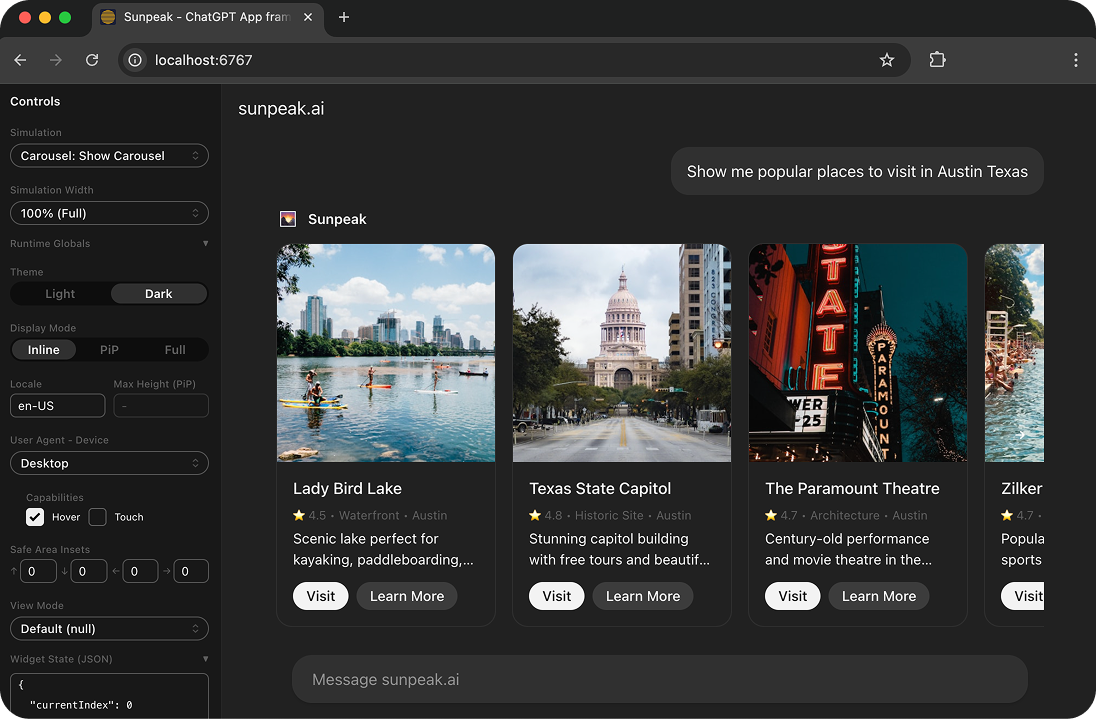
The sunpeak ChatGPT App Inspector running locally.
Want to build a ChatGPT App but don’t have a paid ChatGPT account? You don’t need one. You can build, test, and ship a production-ready ChatGPT App without ever logging into ChatGPT.
TL;DR: Run npx sunpeak new sunpeak-app, then cd sunpeak-app && pnpm dev. Open localhost:3000 to build and test your ChatGPT App in a local replica of the ChatGPT runtime. No subscription, no credits, no manual refresh cycle.
What are ChatGPT Apps?
ChatGPT Apps are interactive UIs that run inside ChatGPT conversations. When a user asks ChatGPT to do something, your App can render a rich interface directly in the chat: forms, dashboards, data visualizations, multi-step workflows, anything you’d build as a web app.
ChatGPT Apps are built on the Model Context Protocol (MCP), an open standard for connecting AI applications to external systems. Your App consists of two MCP primitives:
- Resources are HTML pages rendered in sandboxed iframes inside the chat. This is the UI your user sees and interacts with.
- Tools are actions the AI model can invoke, like fetching data or running a calculation. When a tool has an associated resource, ChatGPT renders that resource as an interactive App.
Because ChatGPT Apps use MCP, the same App also works in Claude (as a connector), VS Code Copilot, and other MCP-compatible hosts. You write one codebase and it runs everywhere.
Why you don’t need a paid account to develop
OpenAI requires developer mode (and a paid ChatGPT Plus, Team, or Enterprise subscription) to connect custom Apps to ChatGPT. That makes sense for live testing, but it creates a barrier for developers who just want to build.
The sunpeak Inspector removes that barrier. It replicates the ChatGPT App runtime on your local machine, so you can develop and test your entire App without any ChatGPT account. The Inspector runs at localhost:3000 and shows exactly how your App will look and behave inside ChatGPT.
Here’s what the local development flow looks like:
npx sunpeak new sunpeak-app
cd sunpeak-app
pnpm dev
Open localhost:3000 and your App is running in the Inspector. That’s it.
What you can do locally
The Inspector replicates the full ChatGPT App runtime, so local development covers everything you need during the build phase:
- Build and test your UI components with hot reloading (every code change appears instantly, no manual refresh)
- Switch between all three display modes: inline, fullscreen, and picture-in-picture
- Toggle light and dark themes
- Configure tool invocations with mock responses
- Load simulation files for specific App states
- Test across hosts by switching between ChatGPT and Claude from the sidebar dropdown
That last point matters because your ChatGPT App is an MCP App. It runs in Claude (as a connector) and other MCP hosts too. The Inspector lets you verify cross-host behavior from one interface.
Automated testing without an account
Beyond clicking around in the Inspector, sunpeak includes a testing framework so you can write automated tests that run against the local Inspector using Playwright. No paid account, no API credits.
pnpm test           # unit + e2e tests
pnpm test:visual    # visual regression testing
pnpm test:eval      # multi-model LLM evals
Simulation files in tests/simulations/ provide deterministic mock data, so your tests produce the same result every run. You can add these to a CI/CD pipeline and validate every pull request automatically. The complete guide to testing ChatGPT Apps covers this in depth.
This is where skipping the paid account saves real money. If you run 50 test iterations a day against the real ChatGPT, that’s 50 API calls burning credits and requiring a subscription for every developer on your team. With sunpeak, those same tests run locally for free.
When you actually need a paid account
A paid ChatGPT account is only required for three things:
- Live testing against ChatGPT’s AI responses. The Inspector mocks tool responses deterministically, which is better for development. But if you need to see how ChatGPT’s actual model triggers your tools and renders your App, you’ll need to connect to the real thing.
- Deploying your App for end users. When real ChatGPT users interact with your App, it’s served through ChatGPT’s infrastructure, which requires a developer account.
- Publishing to the ChatGPT marketplace. Listing your App for others to discover requires a verified developer account.
For everything else, local development, automated testing, building production bundles, and even testing in Claude, a paid ChatGPT account isn’t needed.
Connecting to ChatGPT when you’re ready
When you do want to test against the real ChatGPT, expose your local MCP server with a tunneling tool like ngrok (a free ngrok account works):
ngrok http 8000Copy the forwarding URL and add it in ChatGPT:
- Go to Settings > Apps > Advanced settings
- Enable Developer mode (requires Plus, Team, or Enterprise)
- Click Create app and enter your ngrok URL with the
/mcppath, for example:https://abc123.ngrok-free.dev/mcp
Start a new conversation, invoke one of your tools, and ChatGPT will call your local MCP server and render your App UI in the chat. The local development guide walks through this in more detail.
Building for production
When your App is ready to ship, build and start the production server:
pnpm build && pnpm startpnpm build compiles your resources into optimized bundles. pnpm start launches the MCP server on port 8000 (configurable via the PORT environment variable). Deploy to any Node.js host, or use createMcpHandler for Express setups and createHandler for serverless platforms. The deployment guide covers production configuration.
Your App works in ChatGPT, Claude, and any other MCP-compatible host from the same build. No separate builds per host.
Get started with the quickstart guide, explore the ChatGPT App framework, or try the full tutorial.
Get Started
npx sunpeak new
Further Reading
- How to run your ChatGPT App locally - full local development walkthrough
- ChatGPT App tutorial - from setup to deployment
- Complete guide to testing ChatGPT Apps - unit, E2E, visual, and eval testing
- Ship a ChatGPT App in 2 commands
- Build an MCP App for ChatGPT and Claude
- ChatGPT App framework overview
- Interactive Inspector demo
- sunpeak quickstart guide
Frequently Asked Questions
Do I need a paid ChatGPT account to build a ChatGPT App?
No. You can build and test your entire ChatGPT App locally using sunpeak's built-in Inspector. The Inspector replicates the ChatGPT App runtime at localhost:3000, including all display modes, themes, tool invocations, and app state management. A paid ChatGPT Plus, Team, or Enterprise subscription is only required when you want to connect your App to the real ChatGPT for live testing or deployment.
What is the sunpeak Inspector and how does it help with ChatGPT App development?
The sunpeak Inspector is a local development tool that replicates the ChatGPT and Claude MCP App runtimes. It renders your App resources exactly as they appear in real hosts, supports all three display modes (inline, fullscreen, picture-in-picture), light and dark themes, tool invocations with mock responses, and hot module replacement for instant feedback on code changes. It runs at localhost:3000 alongside your MCP server on port 8000.
How do I install sunpeak and create a new ChatGPT App project?
Run "npx sunpeak new sunpeak-app" to scaffold a new project. Then run "cd sunpeak-app && pnpm dev" to start the local development server. This launches the Inspector at localhost:3000 and an MCP server at port 8000. Your project includes src/resources/ for UI components, src/tools/ for tool handlers, and tests/ for automated tests.
What is an MCP App and how does it relate to ChatGPT Apps?
MCP Apps are interactive UIs built on the Model Context Protocol (MCP) that render inside AI hosts like ChatGPT, Claude, and VS Code Copilot. ChatGPT Apps are MCP Apps running inside ChatGPT. Because they use the open MCP standard, a single MCP App codebase works across ChatGPT, Claude (as a connector), and other MCP-compatible hosts without code changes.
Can I run automated tests on my ChatGPT App without a paid account?
Yes. sunpeak includes a testing framework that runs against the local Inspector using Playwright. Run "pnpm test" for unit and E2E tests, "pnpm test:visual" for visual regression testing, and "pnpm test:eval" for multi-model LLM evals. Simulation files provide deterministic mock data so tests produce consistent results without any ChatGPT account or API credits.
When do I actually need a paid ChatGPT subscription for ChatGPT App development?
A paid ChatGPT Plus, Team, or Enterprise account with developer mode is only required when you want to connect your App to the real ChatGPT to test against live AI responses, deploy your App for end users, or publish to the ChatGPT marketplace. All local development, automated testing, and production builds work without any account.
Can I build one App that works in both ChatGPT and Claude?
Yes. sunpeak Apps are MCP Apps, so they run across any MCP-compatible host. Write your UI once using portable hooks like useToolData, useHostContext, and useDisplayMode, then test in both ChatGPT and Claude using the Inspector host dropdown. The same codebase works in both hosts without changes.
What hosts support MCP Apps besides ChatGPT?
MCP Apps are supported by Claude, Claude Desktop, VS Code GitHub Copilot, Goose, Postman, and MCPJam. Because MCP is an open standard, any host that implements the MCP Apps extension can render your App. Building with sunpeak means your App works across all of these hosts from a single codebase.
